


Official Wii Thread - Part VI
 08-08-07 | 09:19 PM
#926

DVD Talk Legend
Originally Posted by Groucho
I wouldn't let space concerns keep you from downloading games you want. In the unlikely event that you do run out of room, you can move games you aren't currently playing off to an SD card. Or, just delete them -- you can always download them again for free after you've purchased them.
 08-08-07 | 10:02 PM
#927

DVD Talk Godfather
Originally Posted by Groucho
I wouldn't let space concerns keep you from downloading games you want. In the unlikely event that you do run out of room, you can move games you aren't currently playing off to an SD card. Or, just delete them -- you can always download them again for free after you've purchased them.
Larger storage needs to be addressed.
08-08-07 | 11:57 PM
#929

DVD Talk Hero
Originally Posted by darkside
True, but it would be nice to just have them all playable without moving them back and forth. It isn't a big deal with the VC games, but I'm wondering about Wii Ware and how big those games will be.
08-09-07 | 06:51 AM
#930
DVD Talk Gold Edition
Joined: Feb 2000
Posts: 2,470
Likes: 0
Received 0 Likes
on
0 Posts
From: Space Junk Galaxy
 08-09-07 | 07:06 AM
#931

Originally Posted by Michael Corvin
It's actually more work and takes twice as long to use the SD card. It seems to take about the same time to transfer it as it does to download it. So to transfer it to and back is more work.
Larger storage needs to be addressed.
Larger storage needs to be addressed.
08-09-07 | 07:31 AM
#932
DVD Talk Limited Edition
Joined: Mar 2001
Posts: 6,990
Likes: 0
Received 0 Likes
on
0 Posts
From: Surrounded by idiots...
Originally Posted by Groucho
I wouldn't let space concerns keep you from downloading games you want. In the unlikely event that you do run out of room, you can move games you aren't currently playing off to an SD card. Or, just delete them -- you can always download them again for free after you've purchased them.
08-09-07 | 08:07 AM
#933
First, do these steps in any order: 1) place an SD card in the Wii. 2) Download a VC game 
Ok, now that that's out of the way.
From the Main Wii Menu, click the Wii icon in the lower-left, then "Data Management", then "Wii Channels". Here you should see a listing of all the channels (including VC games) you have download. Just pick the one you want and select "Copy". That's it.
Going back from the SD card is the same except under "Wii Channels" you'll need to select the "SD Card" tab at the top.
Ok, now that that's out of the way.
From the Main Wii Menu, click the Wii icon in the lower-left, then "Data Management", then "Wii Channels". Here you should see a listing of all the channels (including VC games) you have download. Just pick the one you want and select "Copy". That's it.
Going back from the SD card is the same except under "Wii Channels" you'll need to select the "SD Card" tab at the top.
08-09-07 | 08:12 AM
#934
Senior Member
Joined: Mar 2003
Posts: 759
Likes: 0
Received 0 Likes
on
0 Posts
From: Satantonio, Tx
My Monday morning routine is figuring out which game(s) to erase to make room for new VC stuff. The minute I download a game I also copy it to my SD card so when I need to I can just erase channels. Having all 48+ channels full is nice but sucks rearranging for new titles, especially N64 games which are memory hogs.
08-09-07 | 08:28 AM
#935
Originally Posted by jediwicz
My Monday morning routine is figuring out which game(s) to erase to make room for new VC stuff. The minute I download a game I also copy it to my SD card so when I need to I can just erase channels. Having all 48+ channels full is nice but sucks rearranging for new titles, especially N64 games which are memory hogs.
08-09-07 | 10:39 AM
#936
DVD Talk Limited Edition
Joined: Mar 2001
Posts: 6,990
Likes: 0
Received 0 Likes
on
0 Posts
From: Surrounded by idiots...
Originally Posted by pinata242
From the Main Wii Menu, click the Wii icon in the lower-left, then "Data Management", then "Wii Channels". Here you should see a listing of all the channels (including VC games) you have download. Just pick the one you want and select "Copy". That's it.
08-09-07 | 10:59 AM
#937
DVD Talk Limited Edition
Joined: Jun 1999
Posts: 5,589
Likes: 0
Received 0 Likes
on
0 Posts
From: Export, PA
Originally Posted by CreatureX
 08-09-07 | 11:32 AM
#939
Originally Posted by Toad
Tried that. As I said, it did not work.
08-09-07 | 11:34 AM
#940
DVD Talk Limited Edition
Joined: Jun 1999
Posts: 5,589
Likes: 0
Received 0 Likes
on
0 Posts
From: Export, PA
Originally Posted by Groucho
Where did you read that the Wii version wouldn't be online? Everything I've read indicated online would be for all systems.
08-09-07 | 11:37 AM
#941
The cover art there doesn't have the WiFi logo that Strikers and Pokemon have... Obviously that could change but I just thought I'd point that out.
In addition to the Wiimote providing the sensor for starpower, I'd assume it also piggybacks the Bluetooth communication. Another reason it *should* be cheaper than the others, but it won't be.
In addition to the Wiimote providing the sensor for starpower, I'd assume it also piggybacks the Bluetooth communication. Another reason it *should* be cheaper than the others, but it won't be.
08-09-07 | 12:01 PM
#942
DVD Talk Gold Edition
Joined: Feb 2000
Posts: 2,470
Likes: 0
Received 0 Likes
on
0 Posts
From: Space Junk Galaxy
Originally Posted by MasterofDVD
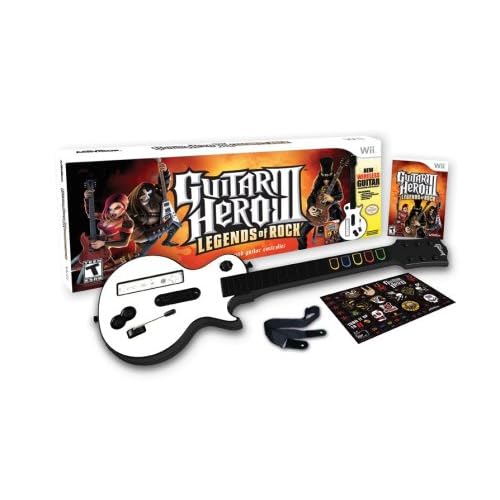
I am assuming that star power is controlled by the inserted Wiimote so the guitar might be a tad cheaper to make. I am also going to speculate that there is no online aspect to the game. Given the prospect of those two things I am amazed they are still charging the price set by the other systems.
Originally Posted by pinata242
In addition to the Wiimote providing the sensor for starpower, I'd assume it also piggybacks the Bluetooth communication. Another reason it *should* be cheaper than the others, but it won't be.
Guitar Hero 3:
Wii: $89.99
PS3: $99.99
X360:$99.99
08-09-07 | 01:53 PM
#945

Moderator
Guitar Hero 3 *will* have online play on the Wii:
http://www.shacknews.com/onearticle.x/47885
The reason there's no Wi-Fi logo is because its a third-party game and won't use Nintendo's network.
http://www.shacknews.com/onearticle.x/47885
The reason there's no Wi-Fi logo is because its a third-party game and won't use Nintendo's network.
08-09-07 | 02:34 PM
#946
DVD Talk Legend
Originally Posted by Groucho
Guitar Hero 3 *will* have online play on the Wii:
http://www.shacknews.com/onearticle.x/47885
The reason there's no Wi-Fi logo is because its a third-party game and won't use Nintendo's network.
http://www.shacknews.com/onearticle.x/47885
The reason there's no Wi-Fi logo is because its a third-party game and won't use Nintendo's network.
08-09-07 | 02:41 PM
#947
DVD Talk Limited Edition
Joined: Mar 2001
Posts: 6,990
Likes: 0
Received 0 Likes
on
0 Posts
From: Surrounded by idiots...
Originally Posted by pinata242
Did you get an error or anything that might help us figure it out? I haven't heard of a game itself not being able to be copied, just save data on some games.
Tried it for all the VC games I downloaded - no luck.
08-09-07 | 03:45 PM
#948
DVD Talk Legend
Originally Posted by KurrptSenate
i can't believe they jacked the price up....again
I'm glad I'm done with that series
I'm glad I'm done with that series
08-09-07 | 03:47 PM
#949
DVD Talk Platinum Edition
Joined: Nov 2006
Posts: 3,170
Likes: 0
Received 0 Likes
on
0 Posts
I can definitely understand the appeal, as I was once "caught up" in it for brief time. After getting GH2, it just became apparent I should be practicing the real thing rather than play the game
I sold it to my brother for a decent price. We were both happy
I sold it to my brother for a decent price. We were both happy
08-09-07 | 07:08 PM
#950
DVD Talk Ultimate Edition
has anyone bought the Nyko Charge Station(or any of them for that matter)? care to give a few words on it if so? I've been trying to decide if I should just buy some new rechargeable AAs since mine are currently not lasting as lng as they used to or if the charge station would be another way to go.
Last edited by ChrisHicks; 08-09-07 at 07:33 PM.