


Randomly unable to post
 04-25-19 | 12:42 AM
#1

Thread Starter
DVD Talk Hero
Randomly unable to post
So I'll type out a fairly long reply to something (3 sentences to 3 paragraphs), hit the button, then get this "error" message...
WTF? My message was definitely longer than 3 characters!
Doesn't happen too often - about once every other day - it's just weird.
The following errors occurred with your submission:
- The message you have entered is too short. Please lengthen your message to at least 3 characters.
Doesn't happen too often - about once every other day - it's just weird.
 04-25-19 | 12:56 AM
#2

DVD Talk Legend
Re: Randomly unable to post
I had this happen in the Never Ending Sequitur thread, recently. Normally, we can just post an image, but in this case I had to add some text.
04-25-19 | 03:54 PM
#4
DVD Talk Legend
Re: Randomly unable to post
For me, it was in 'Other Talk'
04-25-19 | 05:41 PM
#5
Thread Starter
DVD Talk Hero
 04-26-19 | 11:11 AM
#7
Thread Starter
DVD Talk Hero
04-27-19 | 09:39 PM
#8

DVD Talk Hero
Re: Randomly unable to post
I've had a problem posting - but only in Firefox. The comment box is grayed out and I can't enter anything. I've tried various forums, and it's consistent in all. No problem at with Chrome of Vivaldi.
04-29-19 | 01:01 PM
#10
DVD Talk Legend
Re: Randomly unable to post
Chrome on Windows 7 64-bit Pro.
I will add that I haven't had it happen, since the time I initially mentioned.
I will add that I haven't had it happen, since the time I initially mentioned.
04-29-19 | 02:23 PM
#11

DVD Talk Legend
Joined: Nov 2008
Posts: 13,034
Received 1,052 Likes
on
489 Posts
From: Detroit, formerly known as Obi-Wanma
Re: Randomly unable to post
Yeah, this happens if you're just posting an image or a video embed, it doesn't recognize the characters within the tags as counting toward the post limit of 3 characters. It didn't use to be this way, but it is now. Usually I will add 3 periods after the image/video and it will allow me to post. I've noticed others doing the same.
05-10-19 | 09:04 AM
#13

DVD Talk Hero
Re: Randomly unable to post
Don't use Firefox on here 
05-10-19 | 10:19 PM
#15
DVD Talk Hero
Re: Randomly unable to post
What can I say. I find solutions. 
05-24-19 | 11:44 AM
#16

DVD Talk Hero
Re: Randomly unable to post
I can't post on Firefox either. I hit the reply or quote button and it takes me to the next screen to type my post, but when I hit "submit reply" nothing happens.
 05-30-19 | 02:03 AM
#20
Re: Randomly unable to post
Have you tried it out in safe mode? Go to the hamburger menu on the top right and go to help, then "Restart with add-ons disabled."
Firefox has never given me this problem.
Firefox has never given me this problem.
 05-30-19 | 12:37 PM
#22
DVD Talk Hero
Re: Randomly unable to post
Have you tried logging in using Firefox on a totally different computer like at a library? I'm curious if there's some setting that's affecting just you.
 06-04-19 | 11:18 AM
#24

DVD Talk Hero
Re: Randomly unable to post
Never had this issue, despite using Firefox for a long time now... until yesterday.
In this case, it's one specific thread, and only if I'm looking at the last page of the thread:
https://forum.dvdtalk.com/video-game...017-a-371.html
The quick reply box looks like this, and Firefox thinks the page is constantly loading, and there are no formatting buttons available.

On all other pages of the thread (or all other threads I've looked at), my Quick Reply box looks like this:

Note how I can see the formatting buttons now.
Could be, in that one thread, someone's post has some weird code in it. Adam Tyner would probably be the best person to investigate that.
In this case, it's one specific thread, and only if I'm looking at the last page of the thread:
https://forum.dvdtalk.com/video-game...017-a-371.html
The quick reply box looks like this, and Firefox thinks the page is constantly loading, and there are no formatting buttons available.
On all other pages of the thread (or all other threads I've looked at), my Quick Reply box looks like this:
Note how I can see the formatting buttons now.
Could be, in that one thread, someone's post has some weird code in it. Adam Tyner would probably be the best person to investigate that.
06-04-19 | 12:40 PM
#25

DVD Talk Reviewer/ Admin
Joined: Sep 1999
Posts: 31,740
Received 2,828 Likes
on
1,876 Posts
From: Greenville, South Cackalack
Re: Randomly unable to post
I tried that page (and the few before it, since we have different post-per-page settings) in an old version of Firefox (since I hadn't upgraded in a while!) and in the latest version. Everything seems okay with the way I have things setup -- no showstopping errors, and all the WYSIWYG buttons are loading as expected. But it's easy enough to tell exactly what's going on.
.
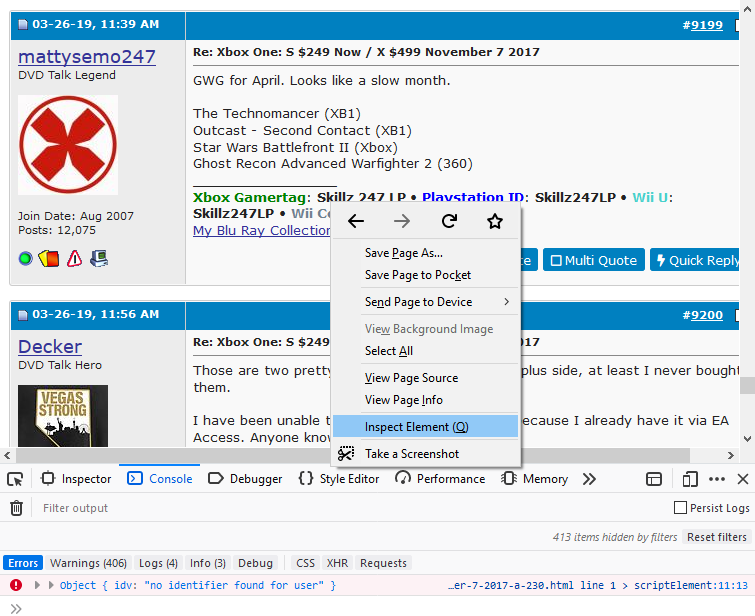
Just copy/paste those error messages here, and I'll try to make sense of them.
.
- Right-click anywhere on the page in Firefox and select "Inspect Element".
- A big box should come up with tabs reading Inspector, Console, Debugger, etc. Click on "Console".
- Look for any nasty error messages. They'll be highlighted in red. If you have the latest and greatest version of Firefox, leave "Errors" as the only thing highlighted in blue (click on everything else that's blue to de-select them), and any non-critical messages will disappear.
Just copy/paste those error messages here, and I'll try to make sense of them.
Last edited by Adam Tyner; 06-04-19 at 12:46 PM.