


HD DVD and Blu-ray FAQ
 08-31-06 | 03:00 PM
#76

DVD Talk Hall of Fame
^Your DVI connection on the TV needs to be HDCP compliant (High-bandwidth Digital Content Protection) to work with HDMI (High Definition Multimedia Interface). An HDMI/DVI cable will transfer the video signal to a DVI/HDCP HDTV (I'm not sure about audio signals because I send audio to my HT receiver). I do this and it works fine.
If your manual doesn't say specifically that your display is "HDCP compliant" you will need to talk to the manufacturer to see if it is (early DVI HDTVs were not HDCP compliant because the standard hadn't been implemented yet). If it is not, your DVI port won't work with the HD DVD player HDMI output and you will be left with using the component inputs on your TV as the next best option.
If your manual doesn't say specifically that your display is "HDCP compliant" you will need to talk to the manufacturer to see if it is (early DVI HDTVs were not HDCP compliant because the standard hadn't been implemented yet). If it is not, your DVI port won't work with the HD DVD player HDMI output and you will be left with using the component inputs on your TV as the next best option.
 08-31-06 | 03:28 PM
#77
DVD Talk Hall of Fame
thanks....I guess this means I'm ok in that regard?
From the manual: "HD INPUT-AV 5—use to connect digital equipment with DVI (digital video interface) 1080i or 480p output. DVI is a specific digital input allowing
encrypted transmission of uncompressed HD content. DVI includes
HDCP (high-bandwidth digital content protection)"
i just called the service number twice...I don't think the people knew what I meant when I said "DVI" and "HDCP", so that's not very reassuring...
He did finally say 'you would need HDMI to DVI,' and said it would work, but second [and third] opinions are nice.
I'm reading a very long thread on another forum, and someone said that when the video is being output via HDMI, the component video output turns off. Is that the same for audio? In my case I would need audio separate from the HDMI, either via optical or analog.
From the manual: "HD INPUT-AV 5—use to connect digital equipment with DVI (digital video interface) 1080i or 480p output. DVI is a specific digital input allowing
encrypted transmission of uncompressed HD content. DVI includes
HDCP (high-bandwidth digital content protection)"
i just called the service number twice...I don't think the people knew what I meant when I said "DVI" and "HDCP", so that's not very reassuring...
He did finally say 'you would need HDMI to DVI,' and said it would work, but second [and third] opinions are nice.
I'm reading a very long thread on another forum, and someone said that when the video is being output via HDMI, the component video output turns off. Is that the same for audio? In my case I would need audio separate from the HDMI, either via optical or analog.
08-31-06 | 04:24 PM
#78
DVD Talk Ultimate Edition
Originally Posted by dtcarson
Is this correct:
Also, I'm seeing some people talking about analog audio. I'm currently using optical audio from my dvd player. My receiver does have "The FRONT, SURROUND, CENTER, and SUBWOOFER jacks can be used to connect a component with an analog multichannel audio output, such as a DVD player with a 5.1-channel analog output." Is this what they are talking about? And is it better than optical audio?
Also, I'm seeing some people talking about analog audio. I'm currently using optical audio from my dvd player. My receiver does have "The FRONT, SURROUND, CENTER, and SUBWOOFER jacks can be used to connect a component with an analog multichannel audio output, such as a DVD player with a 5.1-channel analog output." Is this what they are talking about? And is it better than optical audio?
08-31-06 | 07:36 PM
#79

DVD Talk Legend
Originally Posted by dtcarson
Is this correct:
The current HDDVD players will, as of now, transmit HD signals [1080i] via component cables or HDMI, correct? However, that analog hole could be plugged at any time by studio/release, though there are no current plans to do so.
The HDDVD players do convert SDVD to 1080i reasonably well, but only over HDMI; so if you only have component, you're out of luck.
The current HDDVD players will, as of now, transmit HD signals [1080i] via component cables or HDMI, correct? However, that analog hole could be plugged at any time by studio/release, though there are no current plans to do so.
The HDDVD players do convert SDVD to 1080i reasonably well, but only over HDMI; so if you only have component, you're out of luck.
And if your tv is older, and you have DVI, you need to get an HDMI-DVI cable [which means you'd only be sending audio to the tv with that cable],
Also, I'm seeing some people talking about analog audio. I'm currently using optical audio from my dvd player. My receiver does have "The FRONT, SURROUND, CENTER, and SUBWOOFER jacks can be used to connect a component with an analog multichannel audio output, such as a DVD player with a 5.1-channel analog output." Is this what they are talking about? And is it better than optical audio?
I'm reading a very long thread on another forum, and someone said that when the video is being output via HDMI, the component video output turns off.
Is that the same for audio? In my case I would need audio separate from the HDMI, either via optical or analog.
09-01-06 | 11:01 AM
#80
DVD Talk Hall of Fame
So I could I connect using both the Analog and an optical cable to my receiver? Sometimes for 2-channel stuff I use one of the 'fake' matrixed [right word?] surround sound options on my receiver to get slightly fuller sound, and I would just change the receiver's input from analog to optical depending on what I was watching/listening to.
In order to get Dolby TruHD, I'd need to use the analog connections--would my receiver have to specifically support TruHD? It doesn't mention that anywhere in the manual. Chente, you say "1) There isn't enough bandwidth available to pass Dolby TruHD with it. 2) Even if you could pass it, your receiver would have to be able to decode it. I'm not even sure any are available now. Using optical, you are limited to Dolby++". If I use the analog connection, the player would decode the TruHD into a format my reciever could handle? Would I lose any sound quality?
And, to reiterate a question from above, is the upconversion [assuming HDMI/DVI connection] noticeable on SDVD? While there are some HDDVD titles that I'm interested in [and probably more once I watch a couple], a lot of my viewing would be SDVD.
thanks for all your help.
In order to get Dolby TruHD, I'd need to use the analog connections--would my receiver have to specifically support TruHD? It doesn't mention that anywhere in the manual. Chente, you say "1) There isn't enough bandwidth available to pass Dolby TruHD with it. 2) Even if you could pass it, your receiver would have to be able to decode it. I'm not even sure any are available now. Using optical, you are limited to Dolby++". If I use the analog connection, the player would decode the TruHD into a format my reciever could handle? Would I lose any sound quality?
And, to reiterate a question from above, is the upconversion [assuming HDMI/DVI connection] noticeable on SDVD? While there are some HDDVD titles that I'm interested in [and probably more once I watch a couple], a lot of my viewing would be SDVD.
thanks for all your help.
09-01-06 | 11:28 AM
#81
DVD Talk Special Edition
Joined: Feb 1999
Posts: 1,423
Likes: 0
Received 0 Likes
on
0 Posts
From: Indianapolis, IN
Originally Posted by dtcarson
In order to get Dolby TruHD, I'd need to use the analog connections--would my receiver have to specifically support TruHD? It doesn't mention that anywhere in the manual. Chente, you say "1) There isn't enough bandwidth available to pass Dolby TruHD with it. 2) Even if you could pass it, your receiver would have to be able to decode it. I'm not even sure any are available now. Using optical, you are limited to Dolby++". If I use the analog connection, the player would decode the TruHD into a format my reciever could handle? Would I lose any sound quality?
09-01-06 | 12:19 PM
#82
DVD Talk Hall of Fame
Thanks.
One more stupid question--I'm reading references to 'the DVI problem' of at least one HD player. What is this problem, how bad is it, and is it fixed?
One more stupid question--I'm reading references to 'the DVI problem' of at least one HD player. What is this problem, how bad is it, and is it fixed?
09-01-06 | 01:57 PM
#83
DVD Talk Hall of Fame
Originally Posted by dtcarson
Thanks.
One more stupid question--I'm reading references to 'the DVI problem' of at least one HD player. What is this problem, how bad is it, and is it fixed?
One more stupid question--I'm reading references to 'the DVI problem' of at least one HD player. What is this problem, how bad is it, and is it fixed?
There are other reports of "black crush" when using DVI. Exactly what happens is unclear to me but my sense is that it is a pretty subtle problem with obtaining "blacker than black" levels. The reports I have read suggest that this is not fixed in firmware 2.0. Since I am a casual user, as opposed to a videophile with very high end equipment, I don't notice any problems with my HDMI/DVI use. (Others more knowledgeable can correct me if I am wrong about this reported problem.)
Some inexpensive cable options:
for HDMI/DVI video:
http://www.monoprice.com/products/pr...ormat=2&style=
(other lengths are available; because the cable is thick and stiff, allow some extra length for bends)
for analog 5.1 audio:
http://www.monoprice.com/products/pr...ormat=2&style=
(three sets of two are needed for 5.1)
Originally Posted by dtcarson
So I could I connect using both the Analog and an optical cable to my receiver? Sometimes for 2-channel stuff I use one of the 'fake' matrixed [right word?] surround sound options on my receiver to get slightly fuller sound, and I would just change the receiver's input from analog to optical depending on what I was watching/listening to.
Originally Posted by dtcarson
And, to reiterate a question from above, is the upconversion [assuming HDMI/DVI connection] noticeable on SDVD? While there are some HDDVD titles that I'm interested in [and probably more once I watch a couple], a lot of my viewing would be SDVD.
Last edited by lizard; 09-01-06 at 02:23 PM.
09-02-06 | 02:59 AM
#84
DVD Talk Ultimate Edition
A couple of audio questions that I hope one of you kind people can help me with:
1) If I am connecting only with analog cables, do any of the audio settings besides the 5.1 set up mean anything to me? I'm assuming no. I've defaulted HDMI setting to "auto" and Digital Out SPDIF to "bitstream".
2) I've discovered that my sub-woofer is inactive when connecting via analog. As a test, I connected a digital optical cable and played the Echo Game chapter from House of Flying Daggers and the sub-woofer performed normally. When listening over the analog connection, I get the sound of the beans hitting the drums. It isn't a bad cable, as I swapped various out and still didn't get a signal. Any clues? I have v1.4 of the firmware if that is important.
3) If I'm connected to my receiver via optical AND analog outs, I'm assuming that both connections are outputing audio and it is up to me to tell my receiver which to listen too. Is this correct?
4) When outputing Dolby++ over analog, will the receiver recognize it as a DD signal? If I was playing it over the optical cable it would show up as DTS but I don't see something similar when outputting over analog cables.
Thanks.
1) If I am connecting only with analog cables, do any of the audio settings besides the 5.1 set up mean anything to me? I'm assuming no. I've defaulted HDMI setting to "auto" and Digital Out SPDIF to "bitstream".
2) I've discovered that my sub-woofer is inactive when connecting via analog. As a test, I connected a digital optical cable and played the Echo Game chapter from House of Flying Daggers and the sub-woofer performed normally. When listening over the analog connection, I get the sound of the beans hitting the drums. It isn't a bad cable, as I swapped various out and still didn't get a signal. Any clues? I have v1.4 of the firmware if that is important.
3) If I'm connected to my receiver via optical AND analog outs, I'm assuming that both connections are outputing audio and it is up to me to tell my receiver which to listen too. Is this correct?
4) When outputing Dolby++ over analog, will the receiver recognize it as a DD signal? If I was playing it over the optical cable it would show up as DTS but I don't see something similar when outputting over analog cables.
Thanks.
Last edited by chente; 09-02-06 at 03:02 AM.
09-02-06 | 03:01 AM
#85
DVD Talk Ultimate Edition
Originally Posted by lizard
Upconversion of SD DVDs works very well using HDMI/DVI. It is only using component output/inputs that upconverting SD DVD is disabled.
09-02-06 | 08:47 AM
#86
DVD Talk Legend
Originally Posted by chente
1) If I am connecting only with analog cables, do any of the audio settings besides the 5.1 set up mean anything to me? I'm assuming no. I've defaulted HDMI setting to "auto" and Digital Out SPDIF to "bitstream".
2) I've discovered that my sub-woofer is inactive when connecting via analog. As a test, I connected a digital optical cable and played the Echo Game chapter from House of Flying Daggers and the sub-woofer performed normally. When listening over the analog connection, I get the sound of the beans hitting the drums. It isn't a bad cable, as I swapped various out and still didn't get a signal. Any clues? I have v1.4 of the firmware if that is important.
3) If I'm connected to my receiver via optical AND analog outs, I'm assuming that both connections are outputing audio and it is up to me to tell my receiver which to listen too. Is this correct?
4) When outputing Dolby++ over analog, will the receiver recognize it as a DD signal? If I was playing it over the optical cable it would show up as DTS but I don't see something similar when outputting over analog cables.
09-02-06 | 07:53 PM
#87
DVD Talk Ultimate Edition
Originally Posted by Josh Z
The Toshiba's subwoofer output over analog is inherently low. If your receiver will allow you to boost that channel about 10db, that's the thing to do. If not, in the Toshiba's speaker calibration settings you should set the Subwoofer for the "0" high point and all of the other speakers down towards the bottom of the scale. This will lower your overall volume, but allow the subwoofer to come out louder in comparison to the other channels. You'll have to compensate for the volume discrepency at your receiver, and keep in mind that if you switch to another audio source your receiver will be set much too loud.
09-02-06 | 11:58 PM
#88
DVD Talk Legend
Originally Posted by chente
I'll planning on buying a sound level meter tomorrow and fool around with this some more.
09-04-06 | 01:38 PM
#89
DVD Talk Ultimate Edition
Originally Posted by Josh Z
The Toshiba's subwoofer output over analog is inherently low. If your receiver will allow you to boost that channel about 10db, that's the thing to do. If not, in the Toshiba's speaker calibration settings you should set the Subwoofer for the "0" high point and all of the other speakers down towards the bottom of the scale. This will lower your overall volume, but allow the subwoofer to come out louder in comparison to the other channels. You'll have to compensate for the volume discrepency at your receiver, and keep in mind that if you switch to another audio source your receiver will be set much too loud.
09-04-06 | 03:16 PM
#90
DVD Talk Legend
Originally Posted by chente
If I adjust the subwoofer channel at the receiver, won't it affect my other sources that don't have the inherently low subwoofer output?
09-04-06 | 03:38 PM
#91
DVD Talk Ultimate Edition
Originally Posted by Josh Z
Depends on the receiver. My Denon has a separate setting for the subwoofer volume that only affects the analog input.
09-07-06 | 11:51 AM
#92

DVD Talk Godfather
I think some clarification on the audio part is needed now that DTS has finalized the naming system:
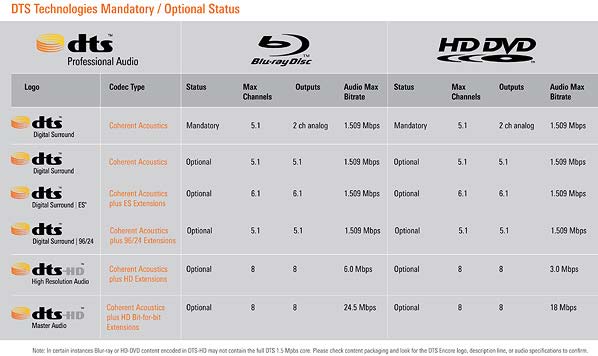
In short, only regular DTS is required, but it has 2x the bitrate that DVDs do. More info here: http://www.audioholics.com/news/pres...DVDformats.php
In short, only regular DTS is required, but it has 2x the bitrate that DVDs do. More info here: http://www.audioholics.com/news/pres...DVDformats.php
09-07-06 | 12:10 PM
#93
DVD Talk Hall of Fame
If regular DTS has 5.1 max channels, but 2-channel analog output, how does that work?
And even if we only get 'regular' DTS, it will be of a better quality/bandwidth than 'regular' DTS from a SDVD?
And even if we only get 'regular' DTS, it will be of a better quality/bandwidth than 'regular' DTS from a SDVD?
09-07-06 | 01:31 PM
#94
DVD Talk Limited Edition
Joined: Mar 2002
Posts: 6,830
Likes: 0
Received 0 Likes
on
0 Posts
From: Mpls, MN
So, that gives us what....DTS, DTS-ES, DTS-96, DTS-HD-HR, DTS-HD-M? Even I'm confused.
"Mandatory" is only 2 channel, because that is needed for compatibility with a simple TV. It downconverts to 2 channel analog PCM output, just like DVD always has.
"Mandatory" is only 2 channel, because that is needed for compatibility with a simple TV. It downconverts to 2 channel analog PCM output, just like DVD always has.
09-07-06 | 01:35 PM
#95
DVD Talk Limited Edition
Joined: Mar 2002
Posts: 6,830
Likes: 0
Received 0 Likes
on
0 Posts
From: Mpls, MN
Oh, and "regular DTS" may or may not be better quality than DVD. The higher bitrate theoretically gives better quality, but it is the same software. It may not be noticeable to most.
09-07-06 | 02:53 PM
#96
DVD Talk Hall of Fame
Okay...'regular' DTS "can be" of better quality than the DTS on my current dvds, because it allows double the bitrate; it's up to the studio/release to use that bitrate well, of course--right?
So the mandatory spec has to support up to 5.1 channels via at least 2 [L/R audio] outputs? [of course you won't get the 5.1 audio from those, but you'll hear everything, just through the two channels].
HDMI -- The current Hd-A1 is HDMI 1.1, the next gen is rumoured to be HDMi 1.3. What's the difference, and why do I care?
So the mandatory spec has to support up to 5.1 channels via at least 2 [L/R audio] outputs? [of course you won't get the 5.1 audio from those, but you'll hear everything, just through the two channels].
HDMI -- The current Hd-A1 is HDMI 1.1, the next gen is rumoured to be HDMi 1.3. What's the difference, and why do I care?
09-07-06 | 03:07 PM
#97

Banned by request
HDMI 1.3 allows for deep color, with more color information being sent to your display, and a pass-through of advanced audio codecs.
In order to take advantage of this, you would need software and a display that takes advantage of deep color, and a receiver capable of decoding the advanced audio codecs.
As far as audio goes, it's a rip. The HD DVD players decode the advanced audio (nothing for DTS HD MA yet, though) and will output them through analogs. No need to buy a new receiver.
As for deep color, no TVs use HDMI 1.3 yet, and when they do, we don't know when or if we'll see software that uses it.
So don't go rebuying your whole HT setup just yet.
In order to take advantage of this, you would need software and a display that takes advantage of deep color, and a receiver capable of decoding the advanced audio codecs.
As far as audio goes, it's a rip. The HD DVD players decode the advanced audio (nothing for DTS HD MA yet, though) and will output them through analogs. No need to buy a new receiver.
As for deep color, no TVs use HDMI 1.3 yet, and when they do, we don't know when or if we'll see software that uses it.
So don't go rebuying your whole HT setup just yet.
09-07-06 | 03:27 PM
#98
DVD Talk Legend
Originally Posted by Suprmallet
As for deep color, no TVs use HDMI 1.3 yet, and when they do, we don't know when or if we'll see software that uses it.
09-07-06 | 03:36 PM
#99
DVD Talk Hall of Fame
So the next gen of player [just the Toshiba, or all of them?], will be able to support an upgrade version of a transmission method that includes the feature of 'deep color'--that the disks the players are used for, won't ever use?  I'm sorry, I am actually interested, and this sounds really silly/stupid. I think it's officially time for the industry to put the brakes on and compare what they're producing, to what can be used, to what people are using.
If I'm misunderstanding, hey, feel free to correct me, but this doesn't make a lot of sense.
I'm sorry, I am actually interested, and this sounds really silly/stupid. I think it's officially time for the industry to put the brakes on and compare what they're producing, to what can be used, to what people are using. If I'm misunderstanding, hey, feel free to correct me, but this doesn't make a lot of sense.
09-07-06 | 03:40 PM
#100
Banned by request
It makes tons of sense, as I'm sure it cost very little to implement but forces people to buy a brand new HT if they want to make full use of it. Think about how many CE companies stand to gain from this.
For my part, HDMI 1.3 means nothing as I'm not upgrading my receiver until it dies on me, which it won't for years.
For my part, HDMI 1.3 means nothing as I'm not upgrading my receiver until it dies on me, which it won't for years.