


"Your Notifications" link on desktop site no longer working?
 07-25-24 | 11:05 AM
#1
Thread Starter
DVD Talk Limited Edition
"Your Notifications" link on desktop site no longer working?
The "Your Notifications" link underneath "Welcome, [username]" near the top right corner of the desktop site does not appear to be working. Clicking on the link (which is supposed to go to forum.dvdtalk.com/usercp.php) does not redirect to that page or do anything else. I believe the down arrow next to the number of notifications also used to open a drop-down menu when clicked, but that is also doing nothing.
I have been able to replicate this on both Firefox version 128 and Edge version 126 on Windows 10.
The "User CP" link in the blue bar directly under this box is still working fine, however, so notifications can still be accessed that way.
I have been able to replicate this on both Firefox version 128 and Edge version 126 on Windows 10.
The "User CP" link in the blue bar directly under this box is still working fine, however, so notifications can still be accessed that way.
 07-25-24 | 11:10 AM
#2
DVD Talk Legend
Re: "Your Notifications" link on desktop site no longer working?
Same for me. However, right clicking "Your Notifications" and selecting open in a new tab does bring you to the correct CP page.
The following 2 users liked this post by Noonan:
Adam Tyner (07-25-24),
printerati (07-25-24)
07-25-24 | 03:04 PM
#3
Thread Starter
DVD Talk Limited Edition
Re: "Your Notifications" link on desktop site no longer working?
As luck would have it, I just got a new PM, and the drop-down menu is working again. The link/menu still does not work when the unread count is zero (and I'm almost certain it used to).
Last edited by printerati; 07-25-24 at 03:31 PM.
07-26-24 | 11:42 AM
#4
Administrator
Re: "Your Notifications" link on desktop site no longer working?
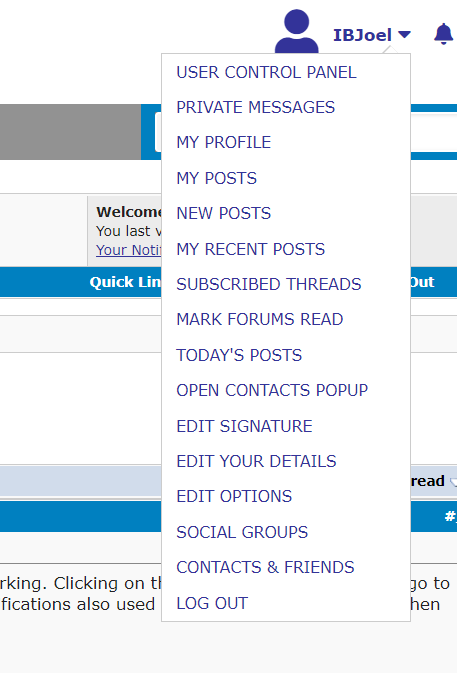
You should still have the other one working, no?
07-29-24 | 10:51 AM
#5
Thread Starter
DVD Talk Limited Edition
Re: "Your Notifications" link on desktop site no longer working?
Yes, that one also still works just fine. Perhaps I'm just misremembering that the Your Notifications menu doesn't expand when clicked if the unread count is 0.
07-29-24 | 11:06 AM
#6

DVD Talk Legend
Re: "Your Notifications" link on desktop site no longer working?
That link changed with the forum software upgrade at the start of July. It used to give a message count and that's why I recognized something was different.
 10-01-24 | 10:37 AM
#7

DVD Talk Legend
Re: "Your Notifications" link on desktop site no longer working?
I have always been able to access my PMs through hitting the "Your Notifications" button even when I had zero showing. It was a quick way to get to my old PMs but it suddenly is no longer working like that.
It was working just a week or so ago like it always had.
10-02-24 | 03:38 PM
#8
Thread Starter
DVD Talk Limited Edition
Re: "Your Notifications" link on desktop site no longer working?
Just curious if this ever got fixed or if that is just the way it works now?
I have always been able to access my PMs through hitting the "Your Notifications" button even when I had zero showing. It was a quick way to get to my old PMs but it suddenly is no longer working like that.
It was working just a week or so ago like it always had.
I have always been able to access my PMs through hitting the "Your Notifications" button even when I had zero showing. It was a quick way to get to my old PMs but it suddenly is no longer working like that.
It was working just a week or so ago like it always had.
 10-03-24 | 11:01 AM
#10
DVD Talk Legend
Re: "Your Notifications" link on desktop site no longer working?
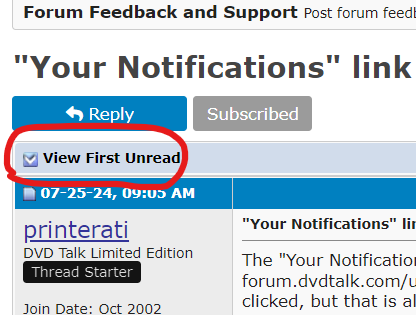
Also noticed that the "newest post" button on the upper left corner has suddenly gone when you hit on a thread that has a new post you haven't read.
That button was the greatest thing ever.
That button was the greatest thing ever.
10-10-24 | 02:28 PM
#11
Administrator
 10-10-24 | 02:29 PM
#12
Administrator
Re: "Your Notifications" link on desktop site no longer working?
The notifications dropdown only works when you have a new notification
10-10-24 | 03:18 PM
#13

DVD Talk Legend
Re: "Your Notifications" link on desktop site no longer working?
I suppose I could have started a new thread, but this falls under the same category as forum features acting strange.
I usually utilize the "new posts" tab to browse the forum. The same button is in the upper left-hand part of the screen on my desktop (and I've used mutliple computers/browsers to test this out).
Here's the direct link: https://forum.dvdtalk.com/search.php?do=getnew
For the last week or two, every time I go to the new posts button it prompts me to wait 10 seconds before doing a search as if I had just attempted one. Anyone else notice this?
I usually utilize the "new posts" tab to browse the forum. The same button is in the upper left-hand part of the screen on my desktop (and I've used mutliple computers/browsers to test this out).
Here's the direct link: https://forum.dvdtalk.com/search.php?do=getnew
For the last week or two, every time I go to the new posts button it prompts me to wait 10 seconds before doing a search as if I had just attempted one. Anyone else notice this?
The following users liked this post:
IBJoel (10-11-24)
10-10-24 | 03:22 PM
#14
DVD Talk Legend
Re: "Your Notifications" link on desktop site no longer working?
Is the link you're using to get to the site initially already doing a New Post search?
10-10-24 | 04:04 PM
#15
DVD Talk Legend
Re: "Your Notifications" link on desktop site no longer working?
Sometimes, perhaps. But I can have a forum tab open on my laptop from a previous day and have the issue. Or even if I go do something else and come back 10 minutes later and click new posts, it forces me to wait the 10 seconds.
10-11-24 | 10:56 AM
#16
Administrator
Re: "Your Notifications" link on desktop site no longer working?
I suppose I could have started a new thread, but this falls under the same category as forum features acting strange.
I usually utilize the "new posts" tab to browse the forum. The same button is in the upper left-hand part of the screen on my desktop (and I've used mutliple computers/browsers to test this out).
Here's the direct link: https://forum.dvdtalk.com/search.php?do=getnew
For the last week or two, every time I go to the new posts button it prompts me to wait 10 seconds before doing a search as if I had just attempted one. Anyone else notice this?
I usually utilize the "new posts" tab to browse the forum. The same button is in the upper left-hand part of the screen on my desktop (and I've used mutliple computers/browsers to test this out).
Here's the direct link: https://forum.dvdtalk.com/search.php?do=getnew
For the last week or two, every time I go to the new posts button it prompts me to wait 10 seconds before doing a search as if I had just attempted one. Anyone else notice this?
10-11-24 | 01:08 PM
#17
DVD Talk Legend
Re: "Your Notifications" link on desktop site no longer working?
Yep. That is it. The weird thing is that it just shows up randomly now. Some threads it is there and some it isn't, and I cannot figure out why.
And yes, I have confirmed there are new posts that I have not read. It is even the "bolded" thread showing there are new posts since my last visit.
Weird, because clicking on it used to take me to my PM section no matter if I had a new one or not. It did that forever until the last month.
And yes, I have confirmed there are new posts that I have not read. It is even the "bolded" thread showing there are new posts since my last visit.
Weird, because clicking on it used to take me to my PM section no matter if I had a new one or not. It did that forever until the last month.
10-11-24 | 01:30 PM
#18
DVD Talk Legend
Re: "Your Notifications" link on desktop site no longer working?
10-11-24 | 01:38 PM
#19
DVD Talk Legend
Re: "Your Notifications" link on desktop site no longer working?
 Why take away a good thing? I have to go through two or three steps just to get to my old PMs now.
Anyone else have the "first unread post" issue like I am?
10-11-24 | 01:45 PM
#20
DVD Talk Legend
Re: "Your Notifications" link on desktop site no longer working?
10-11-24 | 03:41 PM
#21
DVD Talk Legend
Re: "Your Notifications" link on desktop site no longer working?

The following users liked this post:
IBJoel (10-14-24)
10-11-24 | 03:53 PM
#22
DVD Talk Legend
Re: "Your Notifications" link on desktop site no longer working?
 I actually feel your pain. The redesign took away the (desktop) mark forums read link at the bottom of the page. It took me weeks to break the muscle memory as I now had to go up to the dropdown menu to do it.
The following users liked this post:
IBJoel (10-14-24)
10-12-24 | 03:56 PM
#23
DVD Talk Legend
Re: "Your Notifications" link on desktop site no longer working?
The following users liked this post:
IBJoel (10-14-24)
