


Quick Reply filled with entire site
 07-14-24 | 09:51 PM
#1
Thread Starter
DVD Talk Hall of Fame
Quick Reply filled with entire site
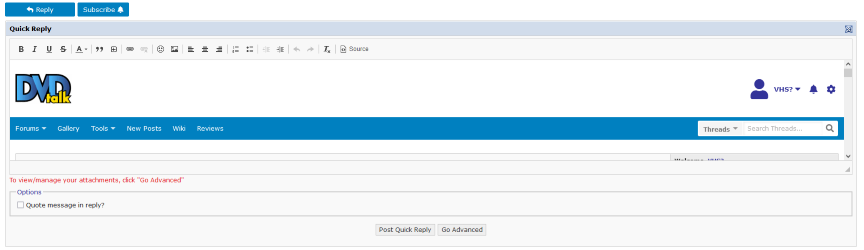
So this has been an issue for a while but never asked about it. Forum issue or is it my end?
 07-14-24 | 10:02 PM
#2

Moderator
Re: Quick Reply filled with entire site
I can't tell what's happening there, can you describe the issue? The issue, of course, being something that I won't have any ability to fix in any way whatsoever yet which I am curious?
07-14-24 | 10:10 PM
#3
Thread Starter
DVD Talk Hall of Fame
Re: Quick Reply filled with entire site
HAHAHA!  all good.
So basically when you're at the bottom of a thread, there is the quick reply box which in most cases is blank so you can type and send. In my case that box is sometimes filled with the entire site inside of it.
I cant type anything. So I have to just hit the reply button at the left so I can reply.
all good.So basically when you're at the bottom of a thread, there is the quick reply box which in most cases is blank so you can type and send. In my case that box is sometimes filled with the entire site inside of it.
I cant type anything. So I have to just hit the reply button at the left so I can reply.
The following users liked this post:
story (07-15-24)
07-15-24 | 02:37 AM
#4

Re: Quick Reply filled with entire site
It happens to me all the time.
The following users liked this post:
devilshalo (01-22-25)
07-15-24 | 09:28 AM
#5

DVD Talk Legend
Re: Quick Reply filled with entire site
Same, it's doing it now. I'm on Firefox if it matters.
07-15-24 | 09:41 AM
#6

DVD Talk Legend
Re: Quick Reply filled with entire site
I've never seen it happen... using Chrome.
07-15-24 | 03:28 PM
#7
Administrator
Re: Quick Reply filled with entire site
I've seen it happen once or twice. Typically it's temporary. Obviously make sure you aren't running content blockers or extra software/scripts
07-15-24 | 03:42 PM
#8
DVD Talk Limited Edition
Re: Quick Reply filled with entire site
It happens to me occasionally as well in Firefox (Windows). Toggling the "source" button is another workaround.
07-15-24 | 03:52 PM
#9
Thread Starter
DVD Talk Hall of Fame
Re: Quick Reply filled with entire site
So then I wonder if this is in fact a Firefox thing?
07-15-24 | 04:29 PM
#10
Moderator
Re: Quick Reply filled with entire site
Okay, I know what you're talking about. I get that every once in a while but if I hit refresh or go away from the page and come back to it, it tends to be fine. It's less of a "quick" reply that way, but whatever is making it do that seems to go away.
07-18-24 | 09:41 AM
#11
DVD Talk Hall of Fame
 07-18-24 | 01:58 PM
#13

DVD Talk Reviewer/ Admin
Joined: Sep 1999
Posts: 31,610
Received 2,772 Likes
on
1,842 Posts
From: Greenville, South Cackalack
Re: Quick Reply filled with entire site
When it does this, what do you see when you click the 'Source' button in the WYSIWYG? And when you say "entire site", does the quick reply box contain a copy of the page you're already looking at?
At the end of the day, the quick reply box is an IFRAME with a blank SRC, so maybe if there's a JavaScript hiccup or something, it tries to fill that empty SRC with the current page.
At the end of the day, the quick reply box is an IFRAME with a blank SRC, so maybe if there's a JavaScript hiccup or something, it tries to fill that empty SRC with the current page.

The following users liked this post:
IBJoel (07-18-24)
07-22-24 | 11:43 AM
#14
DVD Talk Limited Edition
Re: Quick Reply filled with entire site
It actually just did it for me again in Firefox (Windows). As I mentioned above, in my case, pressing the "Source" button in the WYSIWYG editor (to convert it to plain text entry) clears the contents of the quick reply box, and pressing it again to get back to the WYSIWYG editor keeps it cleared. Also, it displayed the forum home page (forum.dvdtalk.com) that lists all of the subforums, not the page I was currently viewing.
The following users liked this post:
Adam Tyner (07-22-24)
07-22-24 | 11:44 AM
#15
DVD Talk Reviewer/ Admin
Joined: Sep 1999
Posts: 31,610
Received 2,772 Likes
on
1,842 Posts
From: Greenville, South Cackalack
Re: Quick Reply filled with entire site
Well, there go my theories.
The following users liked this post:
printerati (07-22-24)
