


HDMI Switcher Problem
 09-15-07 | 02:20 AM
#1

Thread Starter
DVD Talk Godfather & 2020 TOTY Winner
HDMI Switcher Problem
I posted this in the Tech Talk forum and got zero responses. Maybe it should have gone here. I'm wondering if anyone could maybe help me with this:
____________________________________
I just bought a PS3 and decided the time was right for an HDMI switcher. I bought a little cheap one called the Joytech Trilink Switcher from Amazon for $39.99. I like so much about it. It's tiny and very cleverly can be stashed in the back of a home theater console since it has a remote and a remote IR extender that can be mounted to the TV or stereo. It also can run off the USB port so you save an outlet plug!
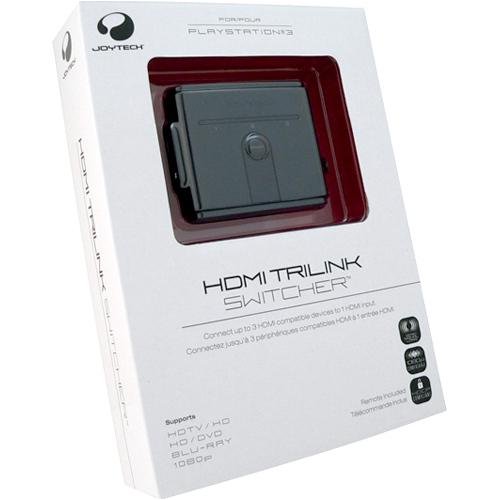
Here's my problem: Even though it says repeatedly on the box "HDCP Compliant", I guess it isn't. It works great with my PS3 and the DVD Player, but when I hook up my cable box I get a message that HDCP doesn't support my HDTV. When I disconnect the box and run the HDMI - DVI cable directly from the cable box to the TV, it works fine. I've emailed the company yesterday and they haven't replied. I don't think there's a way to update the software. Am I just screwed? Is there really a difference in HDTV programming on HDMI vs Component anyway? Should I return this one and get a different brand?
And advice is appreciated. Thanks!
____________________________________
I just bought a PS3 and decided the time was right for an HDMI switcher. I bought a little cheap one called the Joytech Trilink Switcher from Amazon for $39.99. I like so much about it. It's tiny and very cleverly can be stashed in the back of a home theater console since it has a remote and a remote IR extender that can be mounted to the TV or stereo. It also can run off the USB port so you save an outlet plug!
Here's my problem: Even though it says repeatedly on the box "HDCP Compliant", I guess it isn't. It works great with my PS3 and the DVD Player, but when I hook up my cable box I get a message that HDCP doesn't support my HDTV. When I disconnect the box and run the HDMI - DVI cable directly from the cable box to the TV, it works fine. I've emailed the company yesterday and they haven't replied. I don't think there's a way to update the software. Am I just screwed? Is there really a difference in HDTV programming on HDMI vs Component anyway? Should I return this one and get a different brand?
And advice is appreciated. Thanks!

 09-15-07 | 10:31 AM
#3
Thread Starter
DVD Talk Godfather & 2020 TOTY Winner
Maybe I will....
Two questions :
1: Will changing from component cables to HDMI make a noticable difference on by cable box? The HD signal isn't great on the feeds and there's a lot of pixilization with fast action sometimes.
2: Do these Monoprice switchers come with an IR extender or do they need to be in the front of the entertainment system, because that might be the deal breaker, if it's even DVD player size, I won't have room for it in my entertainment center.
Two questions :
1: Will changing from component cables to HDMI make a noticable difference on by cable box? The HD signal isn't great on the feeds and there's a lot of pixilization with fast action sometimes.
2: Do these Monoprice switchers come with an IR extender or do they need to be in the front of the entertainment system, because that might be the deal breaker, if it's even DVD player size, I won't have room for it in my entertainment center.
09-15-07 | 03:59 PM
#4

DVD Talk Special Edition
I assume you have a motorola cable box? Those are notorious for that, especially the DVI ones. I have to run mine straight to my TV also. Maybe request a new box w/ hdmi.
09-15-07 | 04:41 PM
#5
Thread Starter
DVD Talk Godfather & 2020 TOTY Winner
Nope. Scientific Atlanta 8300 HD. It has an HDMI output.
It's a bummer because design-wise, I love the switcher I have and it works great with my Harmony remote.
It's a bummer because design-wise, I love the switcher I have and it works great with my Harmony remote.
