


IR to RF remote control converter
 08-06-10 | 04:50 PM
#1

Thread Starter
DVD Talk Legend
IR to RF remote control converter
http://www.amazon.com/gp/product/B00...=ACZMIPR5MCEV7
anyone have any 1st hand experience with this thing? seems to have some excellent reviews...
anyone have any 1st hand experience with this thing? seems to have some excellent reviews...
 08-24-10 | 06:10 PM
#2
DVD Talk Gold Edition
Joined: Feb 1999
Posts: 2,600
Likes: 0
Received 0 Likes
on
0 Posts
From: HB, CA
Re: IR to RF remote control converter
Yeah I've been using one for about a year now. I use it to control a comcast hd dvr box in another room. Took just a couple minutes to set up, not counting the initial charging of the batteries. It works very well and I have no complaints. I'm actually still on the initial battery charge, I haven't had to swap it or recharge it yet.
08-25-10 | 07:14 AM
#3

Re: IR to RF remote control converter
I have this and it is excellent. I use it to control a receiver in the basement that powers a pair of speakers in the living room and a seperate set on the deck. I still don't quite understand how it works, but it does work well.
08-25-10 | 05:28 PM
#4
Thread Starter
DVD Talk Legend
Re: IR to RF remote control converter
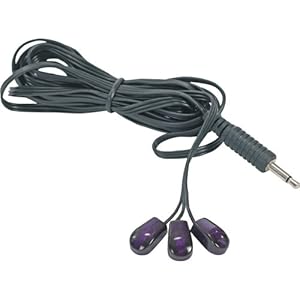
I get the saucer shaped section, but what do these extra things do for you?
08-25-10 | 08:15 PM
#5
DVD Talk Gold Edition
Joined: Feb 1999
Posts: 2,600
Likes: 0
Received 0 Likes
on
0 Posts
From: HB, CA
Re: IR to RF remote control converter
Those are just additional IR emitters. I don't use mine at all since my base sits across the room from the box it controls and has line of sight to the box. If your equipment is in a cabinet and you want to put the base in the cabinet with the gear, that could be a problem. So you plug in the ir emitter into the base, then route each of the emitter pods to where it'll have line of sight to the receiver on the box(es) you wish to control.
08-26-10 | 06:08 PM
#6
Thread Starter
DVD Talk Legend
Re: IR to RF remote control converter
Those are just additional IR emitters. I don't use mine at all since my base sits across the room from the box it controls and has line of sight to the box. If your equipment is in a cabinet and you want to put the base in the cabinet with the gear, that could be a problem. So you plug in the ir emitter into the base, then route each of the emitter pods to where it'll have line of sight to the receiver on the box(es) you wish to control.
08-26-10 | 10:55 PM
#7
DVD Talk Limited Edition
Joined: Mar 2002
Posts: 6,830
Likes: 0
Received 0 Likes
on
0 Posts
From: Mpls, MN
Re: IR to RF remote control converter
What exactly are you planning to use this for? The type of remote doesn't really matter. Systems like this are for getting your IR signal to a place that the remote can't reach, like a different room. Is that what you are considering?
08-27-10 | 06:08 AM
#8
Thread Starter
DVD Talk Legend
Re: IR to RF remote control converter
Should I not be able to just buy this item, and throw the flyer saucer shaped part into the cabinet with the rest of the components and call it a day?
08-27-10 | 06:20 AM
#9
Re: IR to RF remote control converter
The IR emitter on the saucer has to have line of sight with all of the components' IR receivers. If it does, you can call it a day. If not, you will either need to rig it so it does or incorporate the wired IR emitters from post #4.
08-27-10 | 12:13 PM
#10
DVD Talk Limited Edition
Joined: Mar 2002
Posts: 6,830
Likes: 0
Received 0 Likes
on
0 Posts
From: Mpls, MN
Re: IR to RF remote control converter
Just to add....The emitter in the saucer is apparently a blaster type emitter, meaning it has a lot of IR output to reach several machines at once. The little mouse emitters have less output, but are designed to be attached directly to a machine in front of its IR receiver to assure the signal gets to it.
So, just try it with the blaster only, and if it can't quite reach one machine, use one of the mouse emitters to augment. Or use it like belboz said, put it up high behind you or something where it has line of sight to everything.
So, just try it with the blaster only, and if it can't quite reach one machine, use one of the mouse emitters to augment. Or use it like belboz said, put it up high behind you or something where it has line of sight to everything.
08-27-10 | 04:21 PM
#11
Thread Starter
DVD Talk Legend
Re: IR to RF remote control converter
thanks for the responses guys... not sure why I was (am) having so much difficulty figuring this little gadget out
