


need ideas to setup HDTV and cables
 01-15-10 | 10:37 PM
#1
Thread Starter
Senior Member
Joined: May 2000
Posts: 342
Likes: 0
Received 0 Likes
on
0 Posts
need ideas to setup HDTV and cables
installed a 46" LCD for kids playroom. Going to hide all cables behind wall so I only want to do this once.
TV has:
2 component A/V input (5 RCA: RGB+RW)
2 RCA A/V input (3 RCA: RWY)
4 HDMI input
1 USB input
1 optical audio output
1 headphone jack (audio output)
using:
Digital cable box
DVD player
Wii
PC
cable box uses HDMI cable and I am going to leave 2 extra HDMI cables installed for future use. PC has 2 DVI output (nVidia GTX260) one hooked up to monitor and other hooked up to HDMI on TV. Seeing that the Wii and DVD player both use component cables, I would like to install just 1 component cable to the TV to reduce clutter. Is there a splitter that I can use that will allow 2 different sources to enter the same component cable? I would not use them simultaneously of course. Essentially, this would allow me to just choose the component cable input on the TV for either the Wii or DVD, depending on which device is powered on.
Any ideas? Again, this is for kids play room (Wii, cartoons, kids movies, etc.) I'm trying to keep costs down. I'd rather not have 2 component cables bc they are too bulky.
Also, is there anyway to get audio from both TV speakers and headphone jack at same time? I would like to use the headphone jack to connect to my computer audio input for occasionl games/videos.
TV has:
2 component A/V input (5 RCA: RGB+RW)
2 RCA A/V input (3 RCA: RWY)
4 HDMI input
1 USB input
1 optical audio output
1 headphone jack (audio output)
using:
Digital cable box
DVD player
Wii
PC
cable box uses HDMI cable and I am going to leave 2 extra HDMI cables installed for future use. PC has 2 DVI output (nVidia GTX260) one hooked up to monitor and other hooked up to HDMI on TV. Seeing that the Wii and DVD player both use component cables, I would like to install just 1 component cable to the TV to reduce clutter. Is there a splitter that I can use that will allow 2 different sources to enter the same component cable? I would not use them simultaneously of course. Essentially, this would allow me to just choose the component cable input on the TV for either the Wii or DVD, depending on which device is powered on.
Any ideas? Again, this is for kids play room (Wii, cartoons, kids movies, etc.) I'm trying to keep costs down. I'd rather not have 2 component cables bc they are too bulky.
Also, is there anyway to get audio from both TV speakers and headphone jack at same time? I would like to use the headphone jack to connect to my computer audio input for occasionl games/videos.
Last edited by guppie; 01-15-10 at 10:43 PM.
 01-16-10 | 09:13 AM
#2
DVD Talk Gold Edition
Re: need ideas to setup HDTV and cables
I don't think you can find one wall plate that will do everything. This one is a good start:
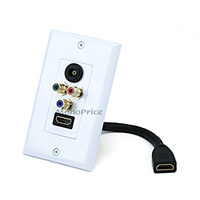
http://www.monoprice.com/products/pr...seq=1&format=2
http://www.monoprice.com/products/pr...seq=1&format=2
01-16-10 | 02:54 PM
#3
DVD Talk Hero
Re: need ideas to setup HDTV and cables
I like the Leviton system (quickport). You can configure anyway you like.
Pick the size/style you want
http://www.levitonproducts.com/catal...65278&pid=1208
Then the module in the number and type you need
http://www.levitonproducts.com/catal...65278&pid=1208
And lastly a faceplate for a neat look
http://www.levitonproducts.com/catal...65278&pid=1208
Is a little more expensive, but IMO worth it for a custom system
This is when I was setting up my system....

Pick the size/style you want
http://www.levitonproducts.com/catal...65278&pid=1208
Then the module in the number and type you need
http://www.levitonproducts.com/catal...65278&pid=1208
And lastly a faceplate for a neat look
http://www.levitonproducts.com/catal...65278&pid=1208
Is a little more expensive, but IMO worth it for a custom system
This is when I was setting up my system....
Last edited by Sdallnct; 01-16-10 at 02:57 PM.
01-17-10 | 04:13 PM
#4
DVD Talk Limited Edition
Joined: Mar 2002
Posts: 6,830
Likes: 0
Received 0 Likes
on
0 Posts
From: Mpls, MN
Re: need ideas to setup HDTV and cables
Lots of people don't want permanent installs unless it is a dedicated room, because everyone moves stuff around so much.
There are component video switchers, good ones are probably pretty pricey, if you can even find them anymore, they used to be $300 and up. However, there are inexpensive options. Any mechanical switcher that switches 3 RCA jacks should be pretty good for picture quality, although these would be push button rather than remote controlled, and you may need to punch the button extra times to get a good connection. Those would include those designed to switch red/white/yellow, the colors don't really matter, although you'd also need to switch audio.
Maybe you could find a good electronic model for a low price used or closeout or something, since they've pretty much been discontinued everywhere.
Your TV probably shuts off its speakers when inserting a headphone plug.
There are component video switchers, good ones are probably pretty pricey, if you can even find them anymore, they used to be $300 and up. However, there are inexpensive options. Any mechanical switcher that switches 3 RCA jacks should be pretty good for picture quality, although these would be push button rather than remote controlled, and you may need to punch the button extra times to get a good connection. Those would include those designed to switch red/white/yellow, the colors don't really matter, although you'd also need to switch audio.
Maybe you could find a good electronic model for a low price used or closeout or something, since they've pretty much been discontinued everywhere.
Your TV probably shuts off its speakers when inserting a headphone plug.
01-19-10 | 08:13 PM
#5
DVD Talk Gold Edition
Joined: Mar 2000
Posts: 2,827
Likes: 0
Received 0 Likes
on
0 Posts
Re: need ideas to setup HDTV and cables
Lots of people don't want permanent installs unless it is a dedicated room, because everyone moves stuff around so much.
There are component video switchers, good ones are probably pretty pricey, if you can even find them anymore, they used to be $300 and up. However, there are inexpensive options. Any mechanical switcher that switches 3 RCA jacks should be pretty good for picture quality, although these would be push button rather than remote controlled, and you may need to punch the button extra times to get a good connection. Those would include those designed to switch red/white/yellow, the colors don't really matter, although you'd also need to switch audio.
Maybe you could find a good electronic model for a low price used or closeout or something, since they've pretty much been discontinued everywhere.
Your TV probably shuts off its speakers when inserting a headphone plug.
There are component video switchers, good ones are probably pretty pricey, if you can even find them anymore, they used to be $300 and up. However, there are inexpensive options. Any mechanical switcher that switches 3 RCA jacks should be pretty good for picture quality, although these would be push button rather than remote controlled, and you may need to punch the button extra times to get a good connection. Those would include those designed to switch red/white/yellow, the colors don't really matter, although you'd also need to switch audio.
Maybe you could find a good electronic model for a low price used or closeout or something, since they've pretty much been discontinued everywhere.
Your TV probably shuts off its speakers when inserting a headphone plug.
http://www.monoprice.com/products/su...09&cp_id=10112
