


Widescreen DVDs on an HDTV
 01-12-08 | 04:33 PM
#1
Thread Starter
DVD Talk Special Edition
Joined: Jun 2005
Posts: 1,640
Likes: 0
Received 0 Likes
on
0 Posts
From: Brooklyn, New Yawk
Widescreen DVDs on an HDTV
My new 52" Sony Bravia XBR got delivered today, and I popped a widescreen dvd in my Sony Upconverter. I never had a widescreen television before, but was always under the impression that a widescreen picture would fill your widescreen television screen. Do I not have my settings right?
 01-12-08 | 04:36 PM
#2

DVD Talk Legend
Depends on the aspect ratio of the movie... 2:35 movies will still have bars on top, 1:85 movies are fairly close to the 16X9 AR so you wont see them. This is a very basic explanation, and others here are much more knowledgeable, but its the basic idea.
01-12-08 | 04:37 PM
#3
DVD Talk Hall of Fame
Not necessarily.
Widescreen tvs are generally a 16:9, however, there are many aspect ratios for movies...1.66:1, 1.78:1, 2.35:1, many more. Unless you're watching a movie that is 16:9 you will still have unused space on your screen.
(this does assume you have your settings correct).
If the dvd is nonanamorphic, that might cause some funkiness, but odds are it's just not a 16:9 movie.
Widescreen tvs are generally a 16:9, however, there are many aspect ratios for movies...1.66:1, 1.78:1, 2.35:1, many more. Unless you're watching a movie that is 16:9 you will still have unused space on your screen.
(this does assume you have your settings correct).
If the dvd is nonanamorphic, that might cause some funkiness, but odds are it's just not a 16:9 movie.
01-12-08 | 04:45 PM
#4
DVD Talk Legend
Originally Posted by Sabrett
My new 52" Sony Bravia XBR got delivered today, and I popped a widescreen dvd in my Sony Upconverter. I never had a widescreen television before, but was always under the impression that a widescreen picture would fill your widescreen television screen. Do I not have my settings right?
Movies that are 1.85:1 aspect ratio will essentially fill up your screen. Movies/TV shows that are 4:3 will have black bars on the sides. Movies that are wider than 1.85:1 (such as 2.35:1) will have narrow black bars on the top and bottom.
If the DVD is widescreen, but letterboxed instead of being "enhanced for widescreen TVs" or "anamorphic," you'll have black bars on all four sides of the picture.
There's a sticky thread somewhere around here that explains aspect ratios. You should probably check it out. It may be in the hardware area.
01-12-08 | 04:52 PM
#5
Thread Starter
DVD Talk Special Edition
Joined: Jun 2005
Posts: 1,640
Likes: 0
Received 0 Likes
on
0 Posts
From: Brooklyn, New Yawk
Thanks! I'm going to check the settings on the TV just to make sure, but I'm pretty sure it's the DVD...it's Live Free or Die Hard Unrated, and it's showing 2.40:1
01-12-08 | 04:58 PM
#6

DVD Talk Legend
Yeah, with a 2.40 AR, you're going to have bars on the top and bottom.
 01-12-08 | 05:18 PM
#8
DVD Talk Legend
Originally Posted by Sabrett
Thanks! I'm going to check the settings on the TV just to make sure, but I'm pretty sure it's the DVD...it's Live Free or Die Hard Unrated, and it's showing 2.40:1
"Live Free or Die Hard" will not fill your screen.
01-12-08 | 08:06 PM
#10

DVD Talk Limited Edition
Just know that an anamorphic widescreen DVD will fill your HDTV to the left and the right sides. It's dependent on the aspect ratio of the original movie/show if it fills the screen to the top and bottom without black bars.
But if the anamorphic DVD does NOT fill your screen to the left and right, then your settings in your DVD player (or possibly your TV) need to be adjusted.
But if the anamorphic DVD does NOT fill your screen to the left and right, then your settings in your DVD player (or possibly your TV) need to be adjusted.
01-12-08 | 08:30 PM
#11
Senior Member
Joined: May 2007
Posts: 958
Likes: 0
Received 0 Likes
on
0 Posts
Originally Posted by Mr. Salty
In addition to what has already been written, make sure you go into your DVD player's setup menu to make sure it's set to output a 16:9 picture.
Movies that are 1.85:1 aspect ratio will essentially fill up your screen. Movies/TV shows that are 4:3 will have black bars on the sides. Movies that are wider than 1.85:1 (such as 2.35:1) will have narrow black bars on the top and bottom.
Movies that are 1.85:1 aspect ratio will essentially fill up your screen. Movies/TV shows that are 4:3 will have black bars on the sides. Movies that are wider than 1.85:1 (such as 2.35:1) will have narrow black bars on the top and bottom.
01-12-08 | 08:37 PM
#12
DVD Talk Hall of Fame
I would think your DVD player would have a setting for how to handle 4:3 content; options like 'auto', 'stretch', 'zoom', '4:3'. You shouldn't have to do it everytime.
Each of my devices (dvd player, tv, cable box) has that setting, it's best to set it on the source device.
Each of my devices (dvd player, tv, cable box) has that setting, it's best to set it on the source device.
01-12-08 | 08:50 PM
#13
DVD Talk Legend
Originally Posted by shyguy1083
random question: i have my dvd setting to 16:9 for my widescreen television, but when i watch a 4:3 show (for example, watching gilmore girls s4 right now) the image stretches to fill the screen, which i kinda don't like. is that normal or should it display with the black bars on the side? i'd prefer that, but when i press aspect on the tv, it just cuts off the sides instead of conforming the picture to the 4:3 ratio. and i don't wanna have to go to my dvd setup menu everytime i watch a tv-on-dvd.
01-12-08 | 08:58 PM
#14

Originally Posted by dtcarson
Easy solution is just to squint your eyes a little bit when watching that movie.

01-20-08 | 11:57 PM
#15
Senior Member
Joined: May 2007
Posts: 958
Likes: 0
Received 0 Likes
on
0 Posts
Originally Posted by Mr. Salty
It should have black bars on the side. What are the aspect ratio options for your TV, and what are the options for your DVD player?
4:3, Full for PC mode
DVD options are: 4:3 letterbox, 4:3 pan&scan, 16:9 wide, 4:3 squeeze
I have the TV on Full... it's the only mode where widescreen fills screen without looking distorted. DVD is on sole 16:9 widescreen option.
on the denon website, it says "Aspect Ratio Function for Correct Image Displays - When you want to view video images with an aspect ratio of 4:3 on a 16:9 Progressive TV monitor, the DVD-1930's Aspect Ratio function converts the images to the correct aspect ratio so that you can enjoy high-quality Progressive output on your screen. This function also converts 16:9 images for output to 4:3 TV screens. " but as I've said before, it fills the screen up instead of pillarboxing.
i tried putting dvd player on 4:3 squeeze, and it does keep the WS stuff WS, but when i'm watching the 4:3 stuff, it does seems "squeezed" rather than normal... unless i've just been used to watching the stuff stretched that now it looks weird when it's normal...
01-21-08 | 12:37 AM
#16

DVD Talk Hero
Originally Posted by shyguy1083
TV options are: 4:3, Zoom, Full, Just, H-fill for TV/AV modes
4:3, Full for PC mode
DVD options are: 4:3 letterbox, 4:3 pan&scan, 16:9 wide, 4:3 squeeze
I have the TV on Full... it's the only mode where widescreen fills screen without looking distorted. DVD is on sole 16:9 widescreen option.
on the denon website, it says "Aspect Ratio Function for Correct Image Displays - When you want to view video images with an aspect ratio of 4:3 on a 16:9 Progressive TV monitor, the DVD-1930's Aspect Ratio function converts the images to the correct aspect ratio so that you can enjoy high-quality Progressive output on your screen. This function also converts 16:9 images for output to 4:3 TV screens. " but as I've said before, it fills the screen up instead of pillarboxing.
i tried putting dvd player on 4:3 squeeze, and it does keep the WS stuff WS, but when i'm watching the 4:3 stuff, it does seems "squeezed" rather than normal... unless i've just been used to watching the stuff stretched that now it looks weird when it's normal...
4:3, Full for PC mode
DVD options are: 4:3 letterbox, 4:3 pan&scan, 16:9 wide, 4:3 squeeze
I have the TV on Full... it's the only mode where widescreen fills screen without looking distorted. DVD is on sole 16:9 widescreen option.
on the denon website, it says "Aspect Ratio Function for Correct Image Displays - When you want to view video images with an aspect ratio of 4:3 on a 16:9 Progressive TV monitor, the DVD-1930's Aspect Ratio function converts the images to the correct aspect ratio so that you can enjoy high-quality Progressive output on your screen. This function also converts 16:9 images for output to 4:3 TV screens. " but as I've said before, it fills the screen up instead of pillarboxing.
i tried putting dvd player on 4:3 squeeze, and it does keep the WS stuff WS, but when i'm watching the 4:3 stuff, it does seems "squeezed" rather than normal... unless i've just been used to watching the stuff stretched that now it looks weird when it's normal...
01-21-08 | 08:28 AM
#17
Senior Member
Joined: Aug 2003
Posts: 826
Likes: 0
Received 0 Likes
on
0 Posts
From: Twin Cities, MN
When I got my first HDTV (almost 5 years ago), I admit I was in the same boat. I thought widescreen was widescreen. But once I understood that studios use different aspect ratios themselves, I even started to notice in the theater that the image varied.
Everyone above has given great explanations, but if you're a visual person here are some sights with examples:
Anamorphic guide
Widescreen
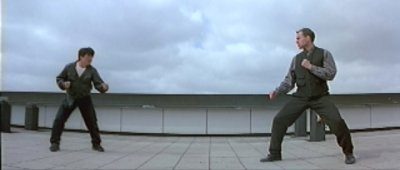
Here are some visual examples of the two most common aspect ratios - it's pretty easy to see the different "shape":
2:35
1:85
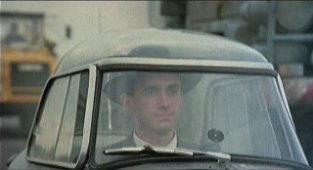
So basically, HDTVs are the "shape" of 1:85 (very close to it, but typically don't see black bars due to overscan). The 2:35 image is shorter and wider. So for the wider image to fit an HDTVs screen, you will see black bars on the top and bottom.
I used to have a link to some great examples that had the two images pasted inside a TV screen that really helped visualize it, but I can't seem to find them...
Everyone above has given great explanations, but if you're a visual person here are some sights with examples:
Anamorphic guide
Widescreen
Here are some visual examples of the two most common aspect ratios - it's pretty easy to see the different "shape":
2:35
1:85
So basically, HDTVs are the "shape" of 1:85 (very close to it, but typically don't see black bars due to overscan). The 2:35 image is shorter and wider. So for the wider image to fit an HDTVs screen, you will see black bars on the top and bottom.
I used to have a link to some great examples that had the two images pasted inside a TV screen that really helped visualize it, but I can't seem to find them...
Last edited by shelland; 01-21-08 at 08:32 AM.
01-21-08 | 08:32 AM
#18

DVD Talk Legend
Do you think if they could do it all again, manufacturers would have made these sets even wider, and shorter, to accomodate 2:40 to 1?
01-21-08 | 08:39 AM
#19

DVD Talk Legend
Originally Posted by TallGuyMe
Do you think if they could do it all again, manufacturers would have made these sets even wider, and shorter, to accomodate 2:40 to 1?
