


Buying a Universal Remote -- anything better than Harmony 676?
 03-24-05 | 04:51 AM
#26
DVD Talk Special Edition
Joined: Feb 1999
Posts: 1,075
Likes: 0
Received 0 Likes
on
0 Posts
From: Easton, PA
Originally Posted by scott1598
i live for my MX-500. i tried others (Sony) but this was incredible.
i have 9 remotes programmed into it.
i can control every tv in my house (5) and even my portable heater and garage door (though i have yet to bring it outside).
i also love love the macro function. every device button i set up a macro so all i have to do is hold a few seconds and wala...
my tv shifts to the correct video output (1-4), my reciever turns on, the correct device function on reciever (dvd, cd, tuner, etc.) turns on, the device turns on (dvd player 1 or 2, vcr, etc.)
and for one dvd player i have the same macro turn the tv to 16:9 screen by going through about 10 key strokes to do so, all in all for that one macro i have 16 key presses from 3 different remotes operating like magic. it is truly awesome.
but, my one favorite macro is: tv on, cable box on, turn cable box to ESPN. so nice!!
i have 9 remotes programmed into it.
i can control every tv in my house (5) and even my portable heater and garage door (though i have yet to bring it outside).
i also love love the macro function. every device button i set up a macro so all i have to do is hold a few seconds and wala...
my tv shifts to the correct video output (1-4), my reciever turns on, the correct device function on reciever (dvd, cd, tuner, etc.) turns on, the device turns on (dvd player 1 or 2, vcr, etc.)
and for one dvd player i have the same macro turn the tv to 16:9 screen by going through about 10 key strokes to do so, all in all for that one macro i have 16 key presses from 3 different remotes operating like magic. it is truly awesome.
but, my one favorite macro is: tv on, cable box on, turn cable box to ESPN. so nice!!
The Harmonies do everything you describe but they call them Activities. A true macro that the Harmony can't be programmed to do is to press a single button to perform a task that might take five button presses for a single device.
Let's say you press the Watch DVD activity. The Harmony will turn on the TV, switch it the correct input and screen format, turn on your receiver and switch it to the correct audio input for the DVD player and finally it will power on the DVD player and start the disc if there's one already loaded. After this is done let's say you wanted to change your audio format on the receiver from DD to DPL and switch the TV's format from widescreen to 4:3 and this takes 5 button presses for two separate components. You can't create a macro to do this in one button press. You would need to create a second activity for watching DVDs that includes these changes but then these changes are locked into that activity and can't be used for you cable TV watching. With a true macro you can use it to perform this task at anytime.
 03-24-05 | 05:06 AM
#27

bboisvert,
I should be getting one for a hands-on review in about 3 weeks. I think they won't be available for purchase until Late April, or early May.
I should be getting one for a hands-on review in about 3 weeks. I think they won't be available for purchase until Late April, or early May.
03-24-05 | 09:08 AM
#28
DVD Talk Gold Edition
Joined: Dec 1999
Posts: 2,708
Likes: 0
Received 0 Likes
on
0 Posts
Originally Posted by chipmac
The Harmonies do everything you describe but they call them Activities. A true macro that the Harmony can't be programmed to do is to press a single button to perform a task that might take five button presses for a single device.
 . If you always do this activity when you are going to watch DVDs, then you can add extra steps to what happens when you click on the button. I've set something similar to this up when I turn on my PS2. It uses the DVD input on my receiver (which for some reason corresponds to the component 2), but uses the optical in, instead of the coax in (which my DVD player uses). When I push the video games 2 button (programmed to my LCD), it switches to DVD, activates the digital audio then goes "up" 3 times to get to the optical, then does these activities backwards when it goes to another input...but like you say, you'd have to do this on the initial activity selection and couldn't do it once you've already switched to that activity (unless like you say to program it to another activity)
03-24-05 | 10:45 AM
. If you always do this activity when you are going to watch DVDs, then you can add extra steps to what happens when you click on the button. I've set something similar to this up when I turn on my PS2. It uses the DVD input on my receiver (which for some reason corresponds to the component 2), but uses the optical in, instead of the coax in (which my DVD player uses). When I push the video games 2 button (programmed to my LCD), it switches to DVD, activates the digital audio then goes "up" 3 times to get to the optical, then does these activities backwards when it goes to another input...but like you say, you'd have to do this on the initial activity selection and couldn't do it once you've already switched to that activity (unless like you say to program it to another activity)
03-24-05 | 10:45 AM
#29
Thread Starter
DVD Talk Legend
Originally Posted by DVD Polizei
bboisvert,
I should be getting one for a hands-on review in about 3 weeks. I think they won't be available for purchase until Late April, or early May.
I should be getting one for a hands-on review in about 3 weeks. I think they won't be available for purchase until Late April, or early May.
I gave in and ordered the Harmony 676 yesterday and it should arrive next week... I did some more reading online and it seemed to have what I wanted. The newer models seemed like overkill to me (in addition to being more $$$$), with a lot of 'media center' functionality.
Still, knowing me, I'll be upgrading this remote in a year... much to the dismay of my wife.
 So, I'd appreciate further discussion/reviews.
03-24-05 | 08:30 PM
So, I'd appreciate further discussion/reviews.
03-24-05 | 08:30 PM
#30
DVD Talk Special Edition
Joined: Feb 1999
Posts: 1,075
Likes: 0
Received 0 Likes
on
0 Posts
From: Easton, PA
Originally Posted by Lampei
You can do this...partially . If you always do this activity when you are going to watch DVDs, then you can add extra steps to what happens when you click on the button. I've set something similar to this up when I turn on my PS2. It uses the DVD input on my receiver (which for some reason corresponds to the component 2), but uses the optical in, instead of the coax in (which my DVD player uses). When I push the video games 2 button (programmed to my LCD), it switches to DVD, activates the digital audio then goes "up" 3 times to get to the optical, then does these activities backwards when it goes to another input...but like you say, you'd have to do this on the initial activity selection and couldn't do it once you've already switched to that activity (unless like you say to program it to another activity)
. If you always do this activity when you are going to watch DVDs, then you can add extra steps to what happens when you click on the button. I've set something similar to this up when I turn on my PS2. It uses the DVD input on my receiver (which for some reason corresponds to the component 2), but uses the optical in, instead of the coax in (which my DVD player uses). When I push the video games 2 button (programmed to my LCD), it switches to DVD, activates the digital audio then goes "up" 3 times to get to the optical, then does these activities backwards when it goes to another input...but like you say, you'd have to do this on the initial activity selection and couldn't do it once you've already switched to that activity (unless like you say to program it to another activity)
03-24-05 | 09:39 PM
#31
DVD Talk Gold Edition
Joined: Dec 1999
Posts: 2,708
Likes: 0
Received 0 Likes
on
0 Posts
Sorry, guess I read it as you couldn't do the extra stuff (you could program it to change to your components, but not the extra 5 button presses after it switched). My explanation probably didn't make much sense anyway 
03-25-05 | 12:17 PM
#32
Cool New Member
Joined: Oct 2004
Posts: 44
Likes: 0
Received 0 Likes
on
0 Posts
From: San Clemente, CA
Originally Posted by bboisvert
I gave in and ordered the Harmony 676 yesterday and it should arrive next week... I did some more reading online and it seemed to have what I wanted. The newer models seemed like overkill to me (in addition to being more $$$$), with a lot of 'media center' functionality.
The 880 will not have macros beyond the "activities", just like the current models, so if you're expecting some increased functionality, there's no reason to wait. The color graphics and rechargeble battery are nice improvements though.
For Tivo users, having macros with Tivo shortcuts to different parts of the Tivo menu is just one reason for Logitech/Harmony to look into having more macro capability on future models.
Last edited by MikeSRC; 03-25-05 at 12:21 PM.
03-30-05 | 01:40 AM
#33

DVD Talk Godfather & 2020 TOTY Winner
Well, I just got a new system and the four remotes I currently need are too daunting. I ordered the Harmony 688 that is reviewed by cnet here. They call it the best remote they ever tested and sounds perfect for me and my needs. It's $148 with $1 shipping at newegg.com. That seems like a bargain considering its MSRP is $249.99. I'll post my impressions next week.
04-02-05 | 10:57 AM
#34
DVD Talk Godfather & 2020 TOTY Winner
Well, to follow up, I love newegg and this remote. It was sent via Fed Ex economy on 3/30 and arrived on 3/31 (!). I was able to set it up in less than 15 minutes and it automatically programmed all the macros I need. I've since easily programmed some more for my PS2, Xbox, etc. My wife just loves that she can watch TV without a big production now. The buttons are a little too small; it's hard to navigate the basics like volume and channel by touch. Outsided of that, it's a fantastic remote. Well worth $150. 4.5/5.0
04-27-05 | 04:22 PM
#36

DVD Talk Hall of Fame
Just got a Harmony 680 today. I will be setting it up and testing tonight. I will let you all know how I like it. It will be operating a 50"LCD TV, 2 DVD players, a VCR, a HD Cable DVR/STB and a CD Changer - plus switching inputs for an XBox and PS2.
Last edited by Cusm; 04-27-05 at 04:24 PM.
04-28-05 | 06:22 AM
#38

DVD Talk Legend
Originally Posted by uberjoe
Why do you have two DVD players?
04-28-05 | 09:46 AM
#39
DVD Talk Platinum Edition
Originally Posted by Chew
I have a changer to watch TV DVDs, a higher end player for movies, and a third that gathers dust. I think a lot of people have more than one.
04-29-05 | 12:38 PM
#41
DVD Talk Limited Edition
Originally Posted by Decker
My wife just loves that she can watch TV without a big production now. The buttons are a little too small; it's hard to navigate the basics like volume and channel by touch. Outsided of that, it's a fantastic remote. Well worth $150. 4.5/5.0
04-29-05 | 03:16 PM
#42
DVD Talk Gold Edition
Joined: Jun 2001
Posts: 2,262
Likes: 0
Received 0 Likes
on
0 Posts
From: Phoenix AZ - West Side
FWIW I love my SONY RM3100. Runs everything including the ceiling fan/light. Macros (opens DVD tray while selecting AMP input, changing TV input, etc), lighted, and easy to use. My kids have been using it for years. The new SO was a bit intimidated at first, but once she got into it, wants one for her place as well.
Plus...it looks cool on the coffee table! Not like just another remote.
Plus...it looks cool on the coffee table!
Not like just another remote.
08-26-05 | 07:52 PM
#43
Originally Posted by bboisvert
Thanks, I would appreciate a review.
I gave in and ordered the Harmony 676 yesterday and it should arrive next week... I did some more reading online and it seemed to have what I wanted. The newer models seemed like overkill to me (in addition to being more $$$$), with a lot of 'media center' functionality.
Still, knowing me, I'll be upgrading this remote in a year... much to the dismay of my wife. So, I'd appreciate further discussion/reviews.
I gave in and ordered the Harmony 676 yesterday and it should arrive next week... I did some more reading online and it seemed to have what I wanted. The newer models seemed like overkill to me (in addition to being more $$$$), with a lot of 'media center' functionality.
Still, knowing me, I'll be upgrading this remote in a year... much to the dismay of my wife.
So, I'd appreciate further discussion/reviews.I'm currently reviewing the Harmony 880, btw.
09-28-05 | 06:57 AM
#44
DVD Talk Legend
Originally Posted by DVD Polizei
Just wanted to check in and see what your experience was with the 676?
I'm currently reviewing the Harmony 880, btw.
I'm currently reviewing the Harmony 880, btw.
09-29-05 | 07:25 AM
#47
DVD Talk Hall of Fame
Joined: Nov 1999
Posts: 8,756
Likes: 0
Received 0 Likes
on
0 Posts
From: Austin, TX
Originally Posted by Spiky
What kind of LCD screen? There are many types.
i guess a touch screen... do any retail stores have a good selection? i'd like to see some for touch and feel
09-29-05 | 10:15 AM
#48
DVD Talk Limited Edition
Joined: Mar 2002
Posts: 6,830
Likes: 0
Received 0 Likes
on
0 Posts
From: Mpls, MN
Not near me, other cities seem to be better, though. I don't think I've ever seen a Pronto on a shelf for sale. Have you ever been to Remote Central? Lots of reviews there, and discussion in the forums.
With a touch screen, there is no feel. If you are used to feeling for buttons in the dark, a touch screen would be a big change. There are 2 kinds of touchscreens, those with dedicated button shapes/areas and those that are wide open for putting buttons anywhere/any shape you want. There's also the Kameleon line, which is sort of a hybrid between button and touch screen. It has a flat surface with buttons beneath.
I see remotes as a very personal thing. What one person loves, another hates, so definitely try to find some to play with a bit to see what works for you. Personally, I don't see much point to the dedicated touchscreen type (picture) since you might as well have a button remote that you can operate without looking at it. I think that Sony line is the dedicated type, but it does have a lot of real buttons, and now you can change labels on the LCD, which makes it better. Recently, more of the touchscreen remotes have had real buttons for the most commonly used buttons, makes it a better combo since you don't have to look at it every time you want to change the volume.
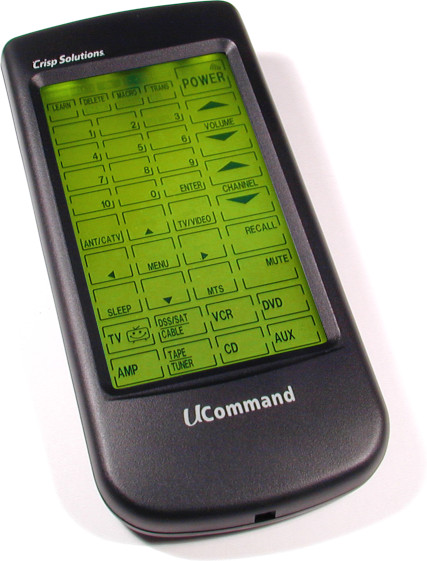
With a touch screen, there is no feel. If you are used to feeling for buttons in the dark, a touch screen would be a big change. There are 2 kinds of touchscreens, those with dedicated button shapes/areas and those that are wide open for putting buttons anywhere/any shape you want. There's also the Kameleon line, which is sort of a hybrid between button and touch screen. It has a flat surface with buttons beneath.
I see remotes as a very personal thing. What one person loves, another hates, so definitely try to find some to play with a bit to see what works for you. Personally, I don't see much point to the dedicated touchscreen type (picture) since you might as well have a button remote that you can operate without looking at it. I think that Sony line is the dedicated type, but it does have a lot of real buttons, and now you can change labels on the LCD, which makes it better. Recently, more of the touchscreen remotes have had real buttons for the most commonly used buttons, makes it a better combo since you don't have to look at it every time you want to change the volume.
09-29-05 | 12:54 PM
#49
DVD Talk Ultimate Edition
I use a MX-500 and really like it. Due to the pecularities of my Sony TV my Macros aren't as straightforward as I would like. On most HDTV's you are able to assign a picture mode to each component you are using but not on mine for some reason. I use "Pro" setting for DVD and HDTV but use "Movie" setting for LD's. Consequently when switching between components I have to toggle between the 4 available picture modes as well as changing the TV input. To solve the problem I had to create an extra macro to turn the return everything to default position when turning off the LD player.
My Macros are
DVDON (turns TV, Receiver & DVD player on and inputs to correct settings). A second press turns everything off.
HDON (Same as above except for HTDV Box)
LDON (Turns on TV, LD player, Receiver, switches picture mode and TV input)
LDOFF (switches the TV input and Picture mode back to default and shuts everything down)
DVD (switches between HDTV viewing settings to DVD viewing settings)
HDTV (switches between DVD viewing settings to HDTV settings)
LD (switches between DVD to LD)
M1 (switches bewteen HDTV and LD)
One big drawback is that you can't map a already created macro to a new button. You are forced to recreate it. I had everything set up and then realized that I wanted to rearrange the location of some functions to different buttons because I would be using them more frequently.
I recommend that you draw out where you want everything so you get it right the first time.
My Macros are
DVDON (turns TV, Receiver & DVD player on and inputs to correct settings). A second press turns everything off.
HDON (Same as above except for HTDV Box)
LDON (Turns on TV, LD player, Receiver, switches picture mode and TV input)
LDOFF (switches the TV input and Picture mode back to default and shuts everything down)
DVD (switches between HDTV viewing settings to DVD viewing settings)
HDTV (switches between DVD viewing settings to HDTV settings)
LD (switches between DVD to LD)
M1 (switches bewteen HDTV and LD)
One big drawback is that you can't map a already created macro to a new button. You are forced to recreate it. I had everything set up and then realized that I wanted to rearrange the location of some functions to different buttons because I would be using them more frequently.
I recommend that you draw out where you want everything so you get it right the first time.
09-29-05 | 03:13 PM
#50
DVD Talk God
Joined: Feb 2000
Posts: 133,159
Received 898 Likes
on
742 Posts
From: Directionally Challenged (for DirecTV)
I like the look of the Harmony remote - since it is button-based and not LCD based - once I get used to a remote, I don't want to have to look at it to know what buttons I am pressing.
How is the Harmony 659? I need to control the following type of components:
Sony Grand Wega
Replay-TV
SA 8000HD (Comcast) DVR
Panasonic S-97 DVD player
I figure the TV and DVD poses no problems, so the key for me is having full functional control over the DVRs (Replays and the Comcast DVR).
How is the Harmony 659? I need to control the following type of components:
Sony Grand Wega
Replay-TV
SA 8000HD (Comcast) DVR
Panasonic S-97 DVD player
I figure the TV and DVD poses no problems, so the key for me is having full functional control over the DVRs (Replays and the Comcast DVR).